If you host a show, run a podcast, or do voiceover work from home, you’ve probably asked the same question I did: “Does my voice actually sound broadcast-ready, or does it just sound fine to me because it’s my voice?”
I run a smooth jazz Sunday show through VirtualDJ, using an Audio-Technica AT2040 dynamic mic, a Universal Audio Volt 1 interface, and a DBX 286s preamp/channel strip. Over the course of about a dozen test recordings, I measured everything — loudness, frequency balance, dynamic range, noise floor — instead of just trusting my ears (which, spoiler: are less reliable than you’d think, in both directions).
This post is the full writeup: what I measured, what surprised me, what I got wrong along the way, and where I landed.
If you’re running a similar chain, or building one, I’m sharing the actual numbers so you don’t have to start from scratch.
The Gear
| Component | Role | Notes |
|---|---|---|
| Audio-Technica AT2040 | Microphone | Hypercardioid dynamic capsule, broadcast-style end-address. No published self-noise spec — dynamic mics have no internal electronics, so noise is entirely a function of your preamp. |
| Universal Audio Volt 1 | Audio interface / preamp | Mic input dynamic range: 112 dB (A-weighted). EIN: -127 dBu. |
| DBX 286s | Channel strip | Compressor, de-esser, enhancer, gate. Mic preamp EIN: -125 dBu. Gate stage dynamic range: ~105 dB (typical). |
Signal path: AT2040 → Volt 1 → DBX 286s → VirtualDJ (mic talkover, 42% duck / 600 ms release).
How I Measured This
No fancy studio gear needed for the measurement side — just ffmpeg (for loudness and dynamics via its EBU R128 and astats filters) and Python with scipy (for frequency-spectrum analysis via Welch’s method).
Every number below came from actually analyzing the recorded files, not from listening tests alone.
The three things I tracked on every take:
- Integrated Loudness (LUFS) — the average perceived loudness of the whole clip.
- True Peak (dBTP) — the highest instantaneous peak, with margin for encoding headroom.
- Loudness Range (LRA) — how much the loudness wanders over time; lower means more consistently “at one level.”
- Frequency balance — energy across seven bands from sub-bass to air.
- Noise floor — how quiet the truly silent portions of the recording are.
Broadcast Loudness Targets, for Reference
There’s no single universal legal standard for radio the way EBU R128 is codified for European broadcast, but here’s the practical reference range:
| Metric | US Commercial Radio | Streaming / Podcast | EBU R128 (Euro broadcast) |
|---|---|---|---|
| Integrated Loudness | -16 to -14 LUFS | -16 to -14 LUFS | -23 LUFS |
| True Peak | -1 dBTP or lower | -1 to -2 dBTP | -1 dBTP |
| Loudness Range (LRA) | 4–8 LU | 4–10 LU | Varies |
| Noise floor / SNR | Below -60 dB | Similar | Similar |
I’d treat -16 to -14 LUFS as the north star for spoken-word broadcast content — it translates well across FM, streaming, and podcast platforms.
Finding #1: The Raw Signal Chain Is Genuinely Clean
Before chasing any EQ or compression settings, I recorded pure silence through the full chain (mic live, nobody talking) to establish a real baseline.
This matters more than people think — most home setups never actually measure this, they just assume.
Result: -95 to -120 dBFS in genuinely silent stretches.
No hum, no hiss, no 60 Hz mains buzz. That lines up well with the manufacturer specs above (Volt 1: 112 dB dynamic range, 286s gate: ~105 dB dynamic range) — meaning the gain staging isn’t throwing away headroom or adding noise beyond what the hardware is rated for.
Lesson for your own setup: do this test first. Record 5–10 seconds of true silence through your exact chain before you touch a single EQ or compressor knob. It tells you what you’re actually working with.
Finding #2: “Noise Floor” Measured During Speech Is Not the Same Thing
Here’s a mistake I made and want to flag so you don’t repeat it: early on, I measured the quietest moments between words in continuous speech and treated that number (around -33 to -35 dB) as “the noise floor.”
I then spent three rounds adjusting the DBX 286s gate/expander threshold (-30 dB → -40 dB → -25 dB) trying to fix it.
It never moved.
Across all three settings, the number stayed within about 1 dB.
The reason: in fast, naturally-paced speech, the gaps between words are too short for the signal to actually decay down to the true noise floor. What I was measuring wasn’t hiss or hum — it was breath sounds and trailing consonants, which are real vocal content, not noise a gate is designed to remove.
No amount of threshold tweaking was ever going to change that number, because there was nothing extra there to catch.
The fix was recording a clip with real, deliberate pauses between sentences — that’s when the signal actually had time to decay, and it dropped cleanly to -85 to -100+ dB, confirming the true noise floor from Finding #1.
Lesson: if you’re chasing a “noise floor” number in a chain that includes continuous speech, make sure you’re measuring actual silence, not just quiet-sounding speech. They are not the same thing, and confusing them will send you down a rabbit hole adjusting the wrong control.
Finding #3: Gate Threshold Direction — A Correction
While we’re on the topic of things I got wrong: I initially advised lowering the expander/gate threshold to “catch” more noise.
This is backwards.
On a downward expander, the threshold is the level below which signal gets attenuated — so lowering the threshold (e.g., -30 dB → -40 dB) actually shrinks the range being reduced, making the gate less aggressive, not more.
Raising the threshold (e.g., toward -25 dB or -20 dB) widens the net.
Small thing, but it’s a common enough mix-up that it’s worth stating plainly for anyone else configuring an expander/gate for the first time.
Finding #4: The Raw vs. Fully-Processed Chain, Side by Side
Once I had a clean unprocessed reference clip, I could measure exactly what the DBX 286s chain (compressor + enhancer + gate + output gain) was actually contributing.
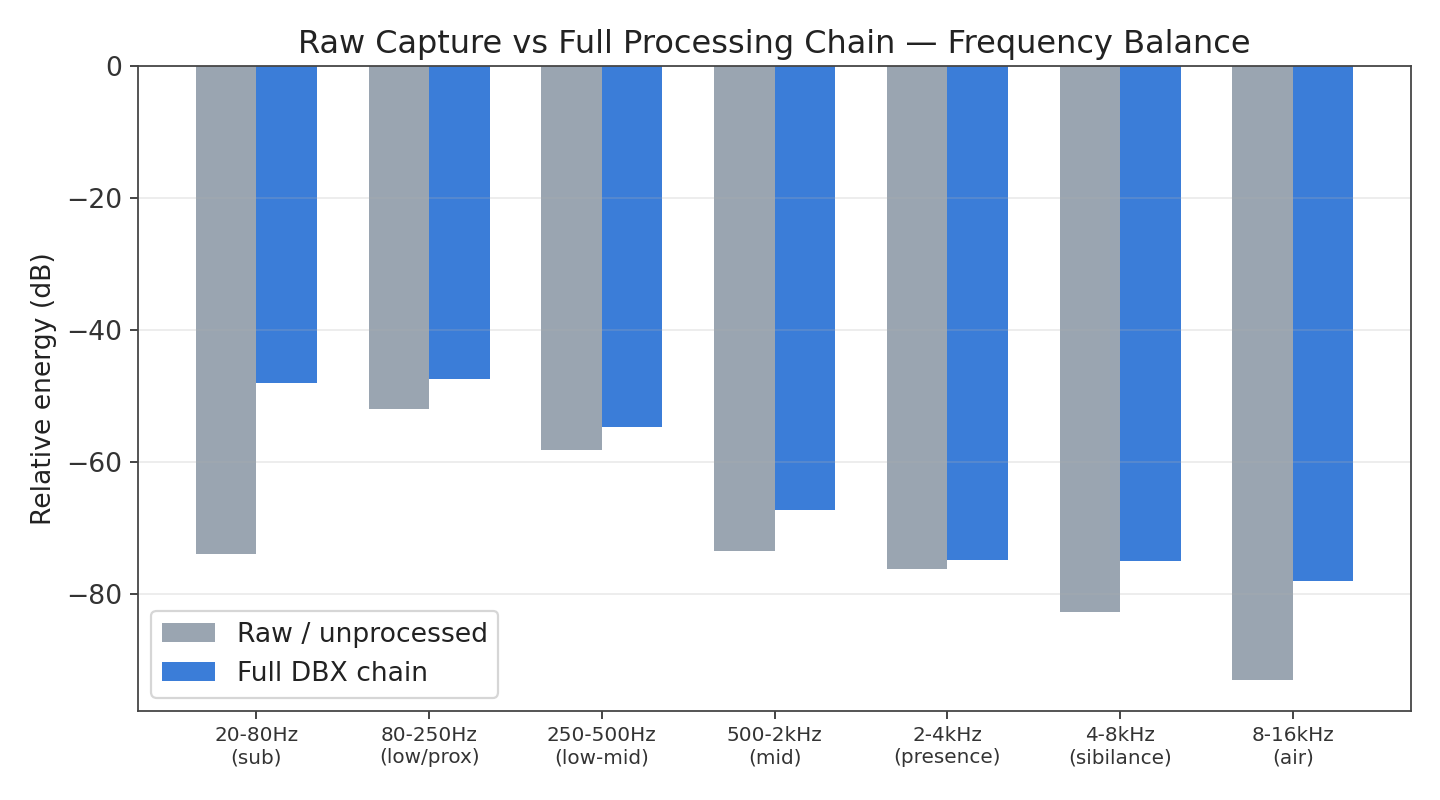
Two clear, measurable wins from the processing chain:
- Sub-bass jumped +25.9 dB, with +4 to +15 dB gains across every other band — real warmth being added, not just perceived.
- Dynamic consistency tightened from a 23.8 dB spread (raw) to 18.1 dB (processed) — the compressor genuinely leveling out the performance.
This is a good sanity check to run on your own chain: record the same phrase dry (bypass everything) and processed, then compare. It’s the clearest way to confirm your hardware is actually doing what you think it’s doing.
Finding #5: Isolating a Single Knob Requires a Controlled Test
Early attempts to A/B test the DBX 286s’s LF enhancer (comparing separate takes recorded at different times/sessions) gave inconsistent, confusing results — sometimes showing an effect, sometimes not, because too many other variables (mic distance, vocal energy, room conditions) were changing between takes along with the knob.
The fix: record the same phrase, same session, back-to-back, changing only the one control being tested.
Here’s the LF enhancer at 2 vs. 7, isolated this way:
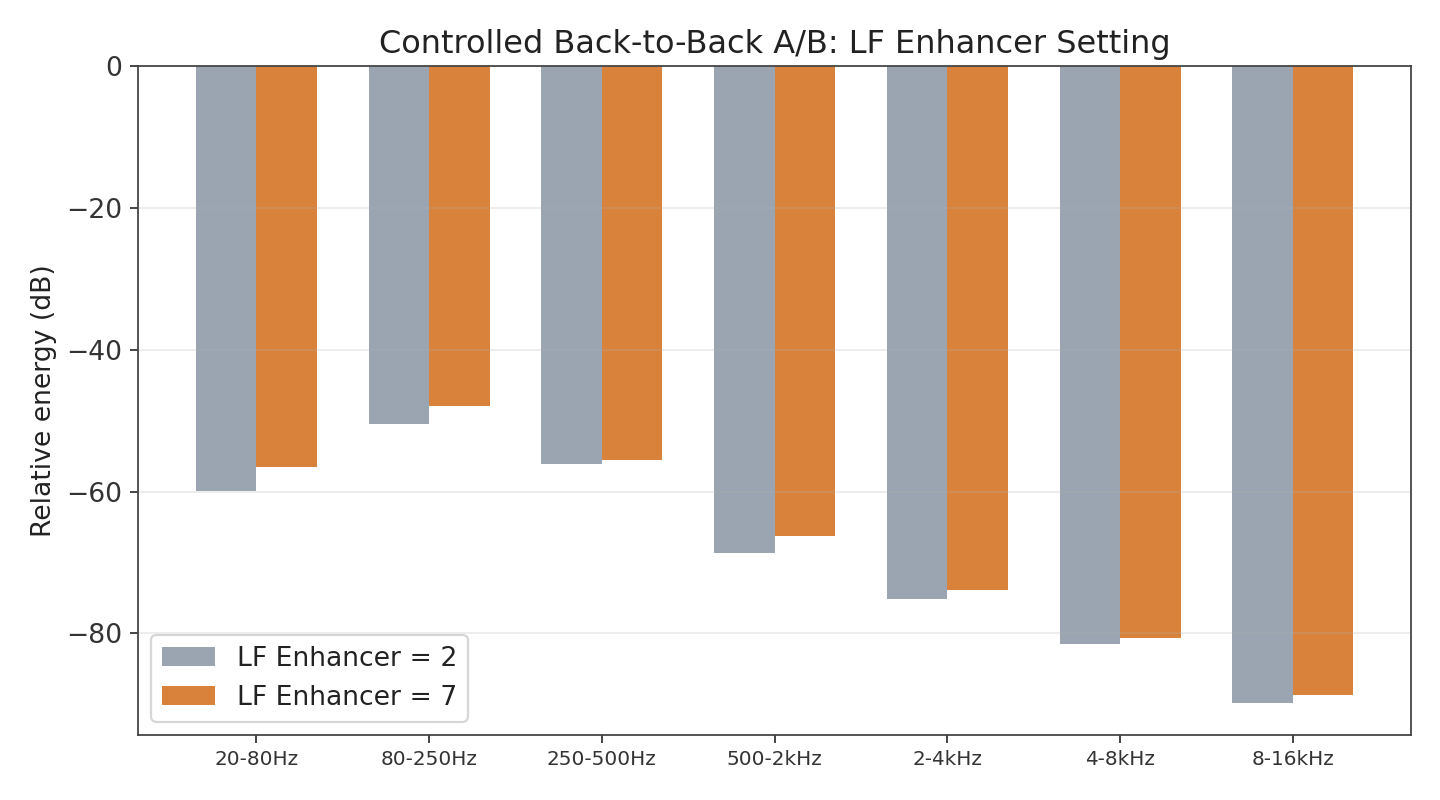
| Band | Change (LF 7 vs LF 2) |
|---|---|
| Sub-bass (20–80 Hz) | +3.5 dB |
| Low/proximity (80–250 Hz) | +2.6 dB |
| Mid (500 Hz–2 kHz) | +2.4 dB |
| Presence (2–4 kHz) | +1.4 dB |
| Air (8–16 kHz) | +1.1 dB |
The low end moved the most, confirming the enhancer is doing real, measurable work — but only once the test was properly isolated.
Worth noting for the technically curious: the DBX 286s LF enhancer spec is actually a boost at 80 Hz paired with a simultaneous cut at 250 Hz — not a broad low-shelf boost.
If you’re measuring in wide frequency buckets (like “80–250 Hz” as one block), the boost and cut can partially cancel out in the average, which is exactly what caused my first few attempts to show “no change” even when the knob was doing something.
Lesson: if you want to know what a single control is really doing, isolate it properly — same script, same session, one variable changed. Comparing across separate recording sessions will give you noisy, misleading data almost every time.
Finding #6: Compressor Tightening — Drive vs. Density
The DBX 286s compressor only has two controls: Drive and Density.
One thing worth knowing up front — the compression ratio itself is fixed by the manufacturer (>4:1 above threshold); Drive and Density shape the threshold/knee behavior rather than the ratio.
Tracking Loudness Range (LRA) across several compressor settings:
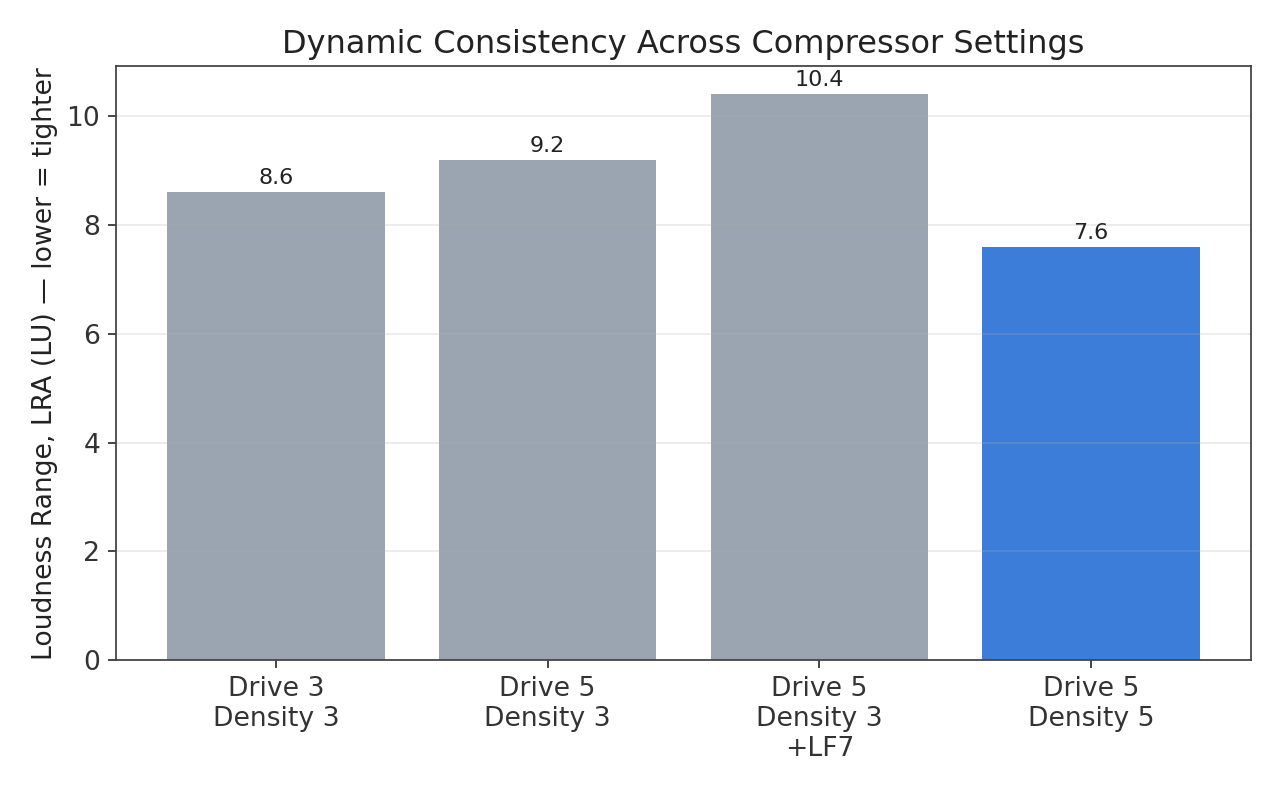
Raising Drive alone (3 → 5) barely moved consistency. Adding Density (5) on top tightened LRA from 9.2 to 7.6 LU — solidly into professional broadcast territory (4–8 LU target).
The takeaway: on this unit, Density did more of the “leveling” work than Drive alone.
Where the Chain Landed
Final settings validated by measurement:
- Compressor: Drive 5, Density 5
- Enhancer: LF ~4–7 (to taste, confirmed working via controlled A/B), HF ~2.5–4
- De-esser: 4 kHz, amount 4
- Expander/Gate: threshold in the -25 to -30 dB range, 3:1 ratio (confirmed non-critical once we established the real noise floor was already excellent)
- Output gain: +3 dB
Final measured results on full-chain takes:
| Metric | Result | Target | Status |
|---|---|---|---|
| Integrated Loudness | -16.0 to -16.3 LUFS | -16 to -14 LUFS | ✅ |
| True Peak | -0.2 to -0.8 dBFS | -1 dBTP or lower | ✅ |
| Loudness Range (LRA) | 7.4–7.7 LU | 4–8 LU | ✅ |
| True noise floor | -95 to -120 dBFS | Below -60 dB | ✅ Well beyond minimum |
Takeaways for Other Enthusiasts
- Measure your true silence first, before touching any processing. It tells you what your hardware can actually do and sets a real baseline.
- Don’t confuse “quiet speech” with “silence.” If you’re chasing a noise floor number, make sure you’re actually measuring silence, isolated from breath sounds and consonant decay.
- Isolate one variable at a time, in the same session, with the same script. Comparing across separate recording sessions introduces too many confounding variables to trust the result.
- Know your expander/gate direction. Lower threshold = less aggressive, not more.
- Loudness metering (LUFS/LRA/true peak) is free and standardized —
ffmpeg’sebur128filter will get you broadcast-grade measurements without buying anything. - Your gear’s manufacturer specs are a useful sanity check, not a replacement for measuring your actual chain — room, gain staging, and encoding all affect the final result.
This isn’t a claim that any of this is groundbreaking science — it’s a documented, measured walkthrough of getting one specific chain (AT2040 + Volt 1 + DBX 286s) dialed in for broadcast use, mistakes and corrections included.
If you’re running similar gear, hopefully it saves you a few of the wrong turns I took.